Install Mylyn Tasks Connector: Web Templates
1. Add Mylyn Incubator plugin into eclipse
Name : Mylyn Incubator
Location : http://download.eclipse.org/mylyn/incubator/3.8


1. Add Mylyn Incubator plugin into eclipse
Name : Mylyn Incubator
Location : http://download.eclipse.org/mylyn/incubator/3.8

Adding Redmine Task Repository
1. Open Task Repository View
2. Click Add Task Repository
3. Select Web Template (Advanced)
4. Next
5. Add the following
Server : http://serverurl/redmine
Label : Redmine Instance
User ID :
Password :
Under Additional Settings
- Add loginToken
Under Advanced Configuration add the following
Task URL : ${serverURL}/issues/
New Task URL : ${serverURL}/projects//issues/new
Login Request URL : ${serverUrl}/login?username=${userId}&password=${password}&authenticity_token=${loginToken}
Login Form URL : ${serverUrl}/login
Login Token Pattern :

Adding Query to Task List View
1. Open Task List View
2. Right Click - New - Query
3. Select Redmine Instance in the List of Repositories
4. Next
5. Enter the following
Query Title : My Redmine Tasks
Under Advanced Configuration
Query URL : ${serverUrl}/projects//issues?query_id=2 ( URL of a prepared Custom Query in Redmine)
Query Pattern : <td class="tracker">({Type}.+?)</td><td class="status">({Status}.+?)</td>.+?<td class="subject">.*?<a href=".*?/issues/({Id}\d+)">({Description}.+?)</a></td>({Optional}<td class="assigned_to"><a href.+?>({Owner}.+?)</a></td>)?

6. Click Preview to verify data can be retrieved
7. Finish
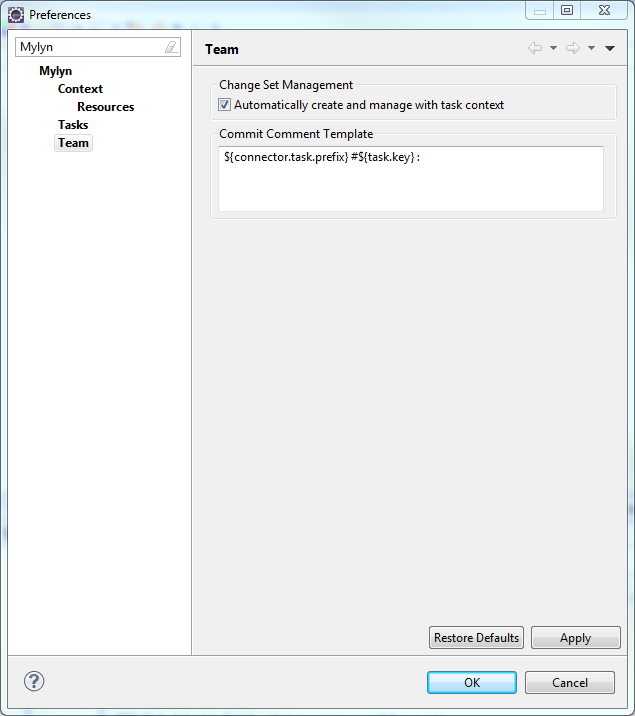
Setup Mylyn Team Preference
When a task is activated and changes is checked in the comments will be prepopulated
1. Window - Preferences - Type Mylyn - Team
2. Under Commit Comment Template put ${connector.task.prefix} #${task.key} :
Setup Redmine Repository Settings
1. Click Administrations - Settings - Repositories
2. In the Referencing keywords add "task"

3. Click Save
Conclusion
By doing this, the revision will automatically be associated to the Redmine task the developer chose to activate in the the task list.
Comments
I am using eclipse juno 4.2 and redmine 2.2
Could you help me?
Resgards